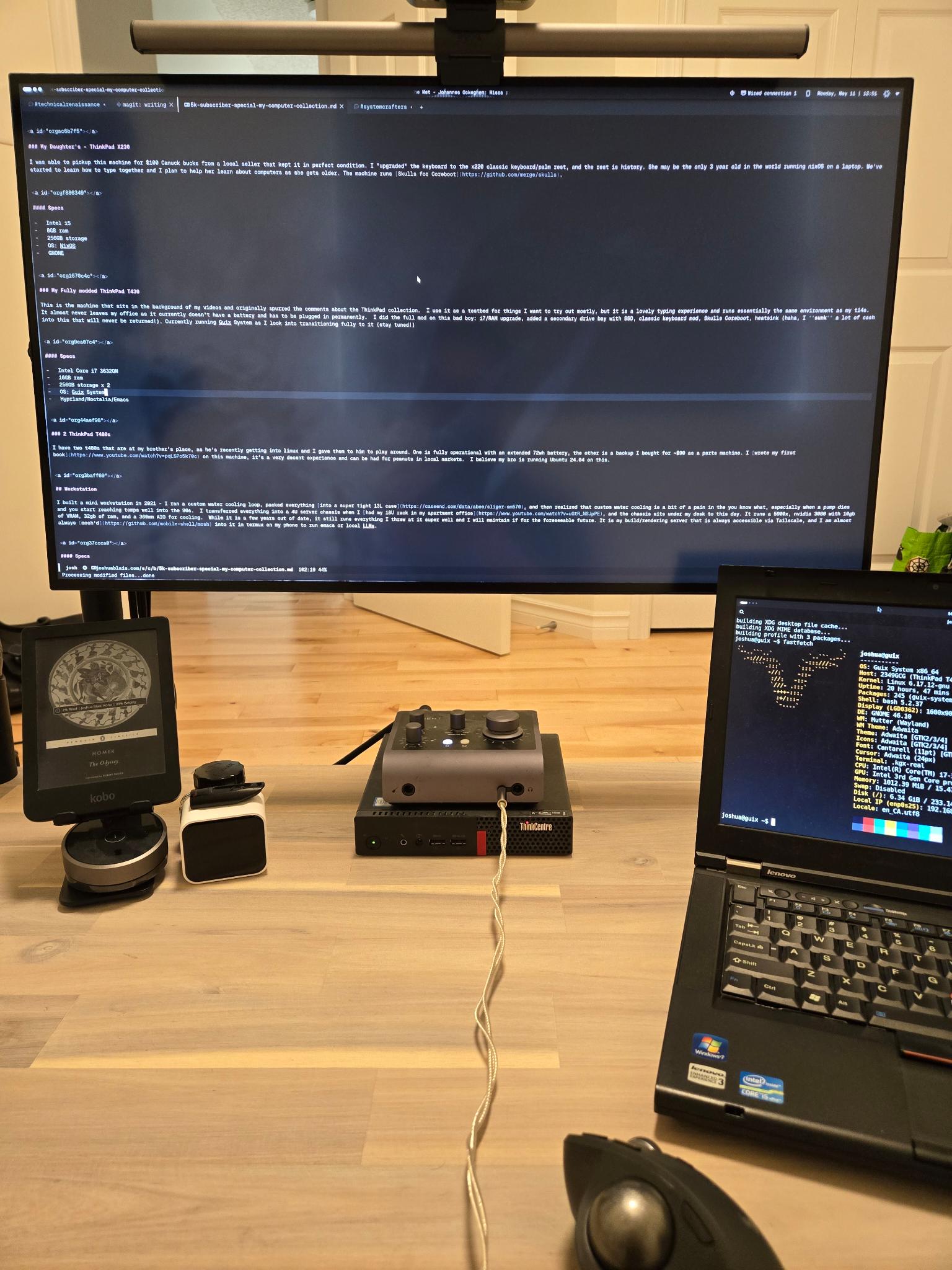
I never thought I would reach 5k subscribers on Youtube, so I owe everyone a massive thank you! To all of my new friends and the support over the last few years, it’s been an awesome time. Here’s to 50,000 in the future!
People have asked in my comments about a “thinkpad collection” tour, and I thought I would do one better - here is a tour of my entire computer infrastructure.
Thinkpads#
Let’s start off with the collection!
I started using Thinkpads in 2018 after falling for the meme (probably from an early Luke Smith video) - I had recently bought a macbook pro (intel, no touchbar) to replace my aging 2011 macbook pro, and was entirely disappointed in the typing experience. This was around the time in which I was first getting into programming - I was typing ~7 or 8 hours a day - and found that I was typing on essentially the table with the butterfly switches as poor as they were in that generation of mac.
I used that machine for maybe 2 months and then sold it to buy a new X1 carbon gen 6 (which was also the year the last great thinkpad was made) and immediately fell in love. I installed Manjaro Linux (after putting Arch on my desktop and failing to maintain it for more than a week without a blackscreen), never once polluting that machine with Windows. I bought a used x220 a few months later to have as a machine to try things on and enjoyed that just as much with the classic keyboard (probably even a bit moreso).
8 years on, Thinkpads are the only laptop that I would buy (even if they are a far cry from that which they used to be in the IBM and early Lenovo days). I know some will call me a “Lenovo plant/shill” - but my opinion on laptops is that there really is no “perfect” machine, and that it does seem like Lenovo is going back to prioritizing servicability in recent years. Would I jump ship to the Framework machines? Maybe. But I haven’t seen anything that would make me do so. I am also not paid to say otherwise, maybe if I were…
As I stated in a previous post, I generally recommend buying slightly older machines, and running those at significant discount - similar to how you should never buy a brand new car. Lenovo is pervasive in the enterprise world, which means these machines come up all of the time at half the sticker price a year later. Not only this, but you save the environment from e-waste, and give life to machines that probably have quite a bit of life left in them. This is another point for rationalizing the ThinkPad above all else.
My daily driver - ThinkPad T14s Gen 3#
I got this machine as the gen 4 was being released and bought it on heavy discount, with 4 years of sealed battery warranty. It’s honestly been solid, the only things I have had to do with it is a new battery (and another one sitting in storage waiting to be installed). I get around 5-6 hours on a single charge, which is enough for me - would I like that to be 20 hours? Sure, but you’re also almost never that far from a power outlet. The laptop was my main and only machine for most of 2024-25, and still handles all that I throw at it with the exception of having a dGPU - which is what my workstation is for. I plan to run it into the ground.
Specs#
- Ryzen 7 6850U
- 32GB ram
- 1TB storage
- OS: NixOS
- Hyprland/Noctalia Shell/Emacs
My “Typewriter” - ThinkPad X201#
The machine I use as a typewriter most mornings with my first coffee of the day is a machine from 2010: an x201. This thing has the best keyboard that has ever been put in a laptop, and it feels as if it were made for typing. I run NixOS in a TUI and run Emacs for editing with a minimalist version of Studium Emacs. NixOS can be suprisingly light when you install just the bare necessities.
Specs#
- Intel i3
- 8GB ram
- 120GB storage
- OS: NixOS
- TUI/Emacs
My Daughter’s - ThinkPad X230#
I was able to pickup this machine for $100 Canuck bucks from a local seller that kept it in perfect condition. I “upgraded” the keyboard to the x220 classic keyboard/palm rest, and the rest is history. She may be the only 3 year old in the world running nixOS on a laptop. We’ve started to learn how to type together and I plan to help her learn about computers as she gets older. The machine runs Skulls for Coreboot.
Specs#
- Intel i5
- 8GB ram
- 256GB storage
- OS: NixOS
- GNOME
My Fully modded ThinkPad T430#
This is the machine that sits in the background of my videos and originally spurred the comments about the ThinkPad collection. I use it as a testbed for things I want to try out mostly, but it is a lovely typing experience and runs essentially the same environment as my t14s. It almost never leaves my office as it currently doesn’t have a battery and has to be plugged in permanently. I did the full mod on this bad boy: i7/RAM upgrade, added a secondary drive bay with SSD, classic keyboard mod, Skulls Coreboot, heatsink (haha, I sunk a lot of cash into this that will never be returned!). Currently running Guix System as I look into transitioning fully to it (stay tuned!)
Specs#
- Intel Core i7 3632QM
- 16GB ram
- 256GB storage x 2
- OS: Guix System
- Hyprland/Noctalia/Emacs
2 ThinkPad T480s#
I have two t480s that are at my brother’s place, as he’s recently getting into linux and I gave them to him to play around. One is fully operational with an extended 72wh battery, the other is a backup I bought for ~$90 as a parts machine. I wrote my first book on this machine, it’s a very decent experience and can be had for peanuts in local markets. I believe my bro is running Ubuntu 24.04 on this.
Workstation#
I built a mini workstation in 2021 - I ran a custom water cooling loop, packed everything into a super tight 13L case, and then realized that custom water cooling is a bit of a pain in the you know what, especially when a pump dies and you start reaching temps well into the 90s. I transferred everything into a 4U server chassis when I had my 18U rack in my apartment office, and the chassis sits under my desk to this day. It runs a 5900x, nvidia 3080 with 10gb of VRAM, 32gb of ram, and a 360mm AIO for cooling. While it is a few years out of date, it still runs everything I throw at it super well and I will maintain if for the foreseeable future. It is my build/rendering server that is always accessible via Tailscale, and I am almost always mosh’d into it in termux on my phone to run emacs or local LLMs.
Specs#
- Ryzen 5900x
- 32GB ram
- 1 TB m.2, 4TB HDD
- OS: NixOS
- Hyprland/Noctalia/Emacs
While the current pricing of machines is not what it previously was, I still stand by the suggestions that if you have a permanently running, powerful, and hardwired machine, you should use that as a build/rendering server for work that requires it, and laptops should just be interfaces into that much more powerful compute.
Servers and Cloud Infra#
Homelab#
I’ve written more about this previously, I run a thinkCenter mini PC as my server running various media and utilities. I will do full video/post about the services I am running in an upcoming video, so Subscribe for that!
VPS’s, S3 storage, Offsite storage#
I run a couple NixOS nodes on Hetzner for serving client projects, my blog, and other upcoming projects. I also host all images and media on an S3 compatible storage bucket which has been super cost effective and enjoyable. Using a storage box with rclone has been my offsite storage method of choice for some years, too.
You can sign up to Hetzner with this link and get €20 of free compute!
CDN#
I have been using BunnyCDN as a CDN for caching media and pointing to the storage bucket as a way to increase speeds on my projects. For ~$1 a month, it’s a pretty worthwhile investment, I think. I have never hit any traffic quotas or any hard limits, but that would be a good problem to have!
Networking#
Everything that I want access to runs on tailscale, with ssh only accessible internally. I have a small travel router (Gl-inet Beryl AX) that runs my home network, with a Netgear RAX80 as the wifi access point. The Gl-inet runs OpenWRT, though in a bit of a “wrapper”. We use oxio internet in Canada for fairly competitive rates (that link will get you a month - and give me a month - free when you sign up!)
I have thought about doing a firewall appliance or pfsense build (or even straight up OpenBSD) in the past, I am open to suggestions and comments below if you have experience with this!
Conclusion#
Thank you all for coming along for the journey! To all that have supported me or donated, it means the world as it helps to keep the lights on while I am trying to do what I love, and I can’t thank you enough.
As always, God bless, and until next time.
If you enjoyed this post, consider Supporting my work, Checking out my book, Working with me, or sending me an Email to tell me what you think..